BlinkFits – Lightweight FITS Viewer
8 minute read
 BlinkFits 1.3
Lightweight FITS viewer for Windows
Find bad frames, stack only the good ones.
BlinkFits can auto-detect and mark frames with satellite trails, soft stars or passing clouds. Blink through your frames with zoom, pan and stretch held perfectly still. Throw bad subs out before you stack and get only the best data.
Extract the zip, then run blinkfits.exe. No installer needed.
Need an older version? All releases are on GitHub.
blinkfits.exe, version 1.3c383a2e6b1a00365e9312c15429e8639afece3c4582ea3de66ff8e1ef617b32bHow to check the exe against it, and what to do when Windows warns you: see below.
- Free
- Windows 10 / 11, 64 bit
- No installer
- Offline, no telemetry
The view never moves, so a trail or a soft frame jumps out at once. BlinkFits finds them for you and tags the files.
New version 1.3 released!4 October 2026
- Cloud detection
- Find blur now also catches frames where a thin cloud drifted past: with Detect clouds checked, it tags every frame whose sky is brighter or more patchy than in the frames taken just before and after it.
- Selecting with the keyboard
- Shift with ↑ or ↓ now starts a fresh selection at the current image once you have moved on, and Ctrl + Shift with ↑ or ↓ adds a new range to the selection you already have.
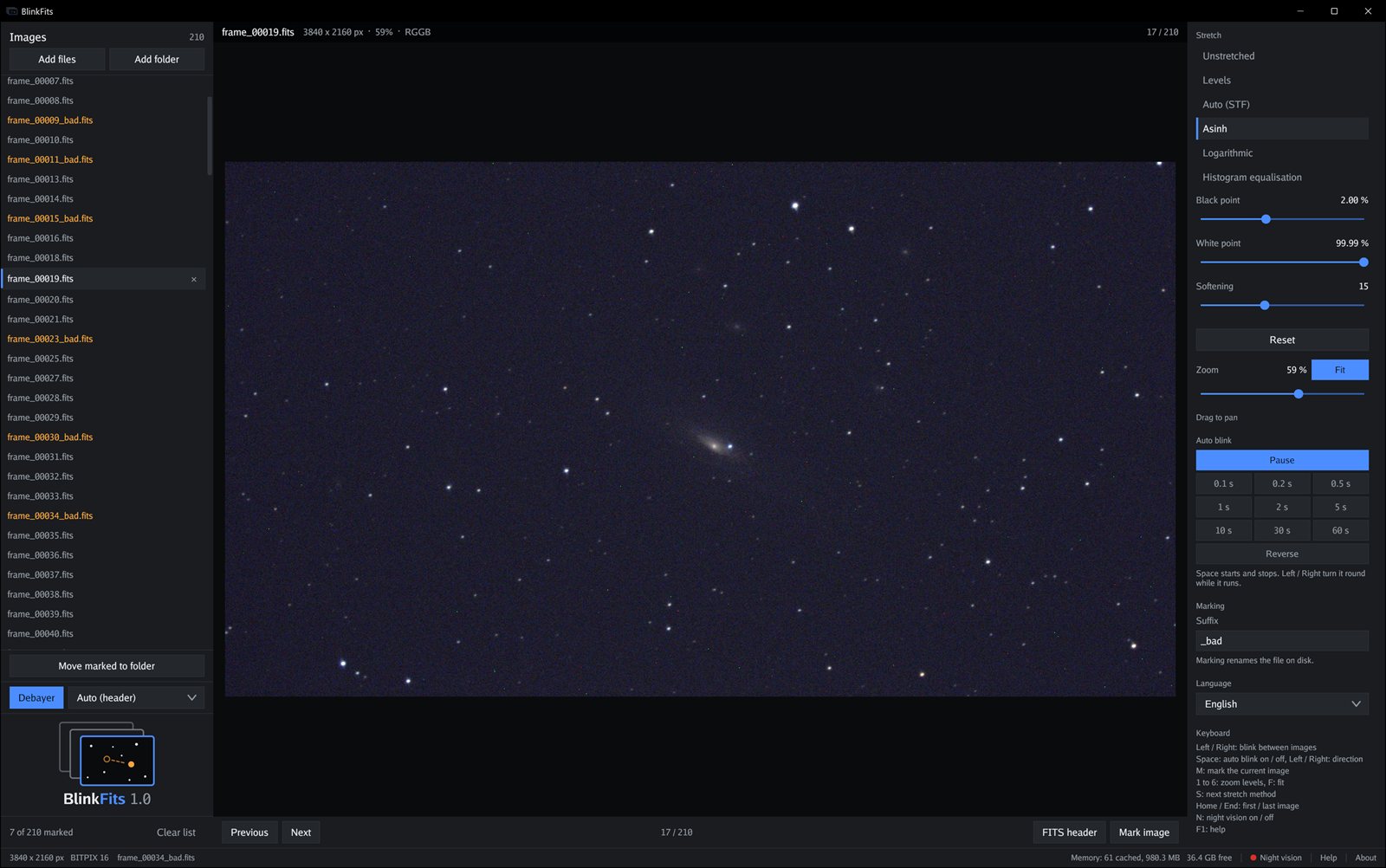
From raw subs to a clean stack
A single satellite trail or a handful of soft frames can cost detail in the final image. Pixel rejection in the stacker catches some of it, but not all. BlinkFits lets you look at every sub and take out the bad ones first.
A night’s work goes like this:
- Press Add folder and add the folders of the night.
- Press Find trails and Find blur. They tag the obvious rejects for you.
- Blink through the rest. Press M on anything the filters missed, such as a guiding error.
- Press X and pick a folder. Every marked and tagged frame moves there.
- Stack what is left.
Check your subs and throw out the bad ones
Let it find the bad subs
With hundreds of subs, going through them one by one takes a long time. Two filters do the first pass:
- Find trails tags frames crossed by a satellite or an aircraft.
- Find blur tags frames whose stars are bloated or gone, compared with the sharpest frame. With Allowed blur deviation you set how much larger the stars may be. With Detect clouds checked, it also tags frames whose sky a passing cloud has brightened or made patchy.
A tag renames the file: frame.fits becomes frame_trail.fits or frame_blur.fits. Show trails and Show blur blink through just those frames, so you can check every find.
If a filter got one wrong, press M on it and the tag comes off.
Mark what the filters missed
Some bad frames need your eye, for example a guiding error. Press M, and the file is renamed on disk with your suffix: frame.fits becomes frame_bad.fits.
The mark lives in the file name, so it is still there next session and in Explorer. Select several frames to mark them in one go. Show marked blinks through only the marked frames.
Move them out of the stack
Move marked to folder, or X, moves every marked and tagged frame into a folder you choose. What stays behind is ready to stack.
The dialog opens in the folder you used last. Each moved file gets a number, so that frames with the same name from different folders never overwrite each other.
The view never moves
Zoom, pan and stretch belong to the viewer, not to the frame. When you switch images, only the sky changes. That is what makes a trail or a soft frame jump out.
Auto blink
Auto blink runs through the frames on its own, at 0.1 s to 60 s per frame, and wraps round at both ends. You steer it like this:
- Space or Pause stops it, and it resumes at the same speed.
- Reverse runs it backwards.
- ← and → turn it round while it runs.
Six stretches
A strong stretch shows faint trails and soft stars that a linear view hides. Auto (STF) is the default. Levels, Asinh, Logarithmic, Histogram equalisation and Unstretched are one click away.
The sliders react instantly, even on large frames.
Past the meridian flip
After a meridian flip, the frames are upside down, which makes blinking the whole night hard. Select the frames taken after the flip and press R to turn them by 180°.
Only the display is turned. The file is never written, and a debayered frame keeps its colours.
One shot colour
Raw OSC frames are debayered from BAYERPAT in the header. You can also pick RGGB, BGGR, GRBG or GBRG yourself. Each channel is stretched on its own, for a neutral sky.
FITS header
When one frame looks off, the header often tells you why. FITS header shows the header cards in place of the image.
Keep blinking and the header follows, frame by frame: exposure, gain, temperature, time and whatever else is in your header.
Zoom in
Zoom shows a frame at 5 to 100 percent, and Magnify carries on up to 10×, so you can compare frames pixel by pixel.
The mouse wheel runs through every step and zooms around the pointer.
Several folders
Add files and folders from different sessions to one list, and remove any of them again. You can also pass paths on the command line.
Careful with memory
BlinkFits keeps 16 bit samples and a cache that fits your RAM. When memory runs short, it shows a clear message instead of swapping your machine to a halt.
15 languages
English, Deutsch, Français, Italiano, Español, Português (BR / PT), Nederlands, Dansk, Svenska, Polski, Русский, Українська, 日本語 and 中文.
Hands on the keyboard
Checking hundreds of subs is fastest without the mouse.
| Key | Action |
|---|---|
| ← → or A D | Go to the previous or next image. While auto blink runs, these reverse its direction. |
| Space | Start or stop auto blink. |
| Home End | Jump to the first or last image. |
| Shift + ↑ ↓ | Start a new selection at the current image and extend it up or down. |
| Ctrl + Shift + ↑ ↓ | Add a new range to the selection. |
| Shift + Home End | Select up to the first or last image of the folder. |
| Ctrl + Shift + Home End | Select up to the first or last image of the whole list. |
| Ctrl + A | Select all images. |
| M | Mark the current image, or every selected one. |
| R | Turn the current image, or every selected one, by 180°. |
| X | Move marked and tagged images to a folder. |
| S | Switch to the next stretch method. |
| 1 … 6 | Zoom to 5, 10, 25, 50, 75 or 100 %. |
| Mouse wheel | Zoom in or out around the pointer, from 5 % to 10×. |
| F or 0 | Fit the image to the window. |
| N | Turn night vision on or off. The interface turns dim red, the image stays as it is. |
| F1 | Open the help. |
| Esc | Close the FITS header, Help or About. Otherwise, clear the selection. |
Files it reads
Straight from your capture software, no conversion.
- Uncompressed FITS with BITPIX 8, 16, 32, 64, −32 or −64, including BZERO / BSCALE and BLANK.
- Mono, raw Bayer and three plane colour images. Raw frames stay grey unless Debayer is on.
- Up to 200 MB per file. Larger ones are refused with a message.
- Not supported: tile compressed FITS (
ZIMAGE, e.g..fz).
What you need
- Windows 10 or 11, 64 bit. Nothing else: one exe, no installer, no runtime, no DLLs.
- Settings live in
%APPDATA%\blinkfits. Delete the exe and that folder, and BlinkFits is gone.
Checking the download
BlinkFits is a hobby project, and the exe is not code signed. Windows treats new, unsigned programs with caution until enough people have run them.
Check the file. The download box above shows the SHA-256 checksum of the exe. If your copy has the same checksum, it arrived intact. After extracting, calculate it in one of two ways:
- In PowerShell:
Get-FileHash .\blinkfits.exe -Algorithm SHA256 - In a command prompt:
certutil -hashfile blinkfits.exe SHA256
Then compare the result with the checksum above.
Windows SmartScreen may say “Windows protected your PC” when you start it. To run BlinkFits anyway:
- Click More info.
- Click Run anyway.
Terms of use
Anyone may download and use BlinkFits free of charge, for any purpose. Redistributing, selling or modifying it, or passing it off as your own work, is not permitted without the author's written permission. It is provided as is, without any warranty.
Contact
Questions, bug reports, a FITS file that will not open? Write to raphi@crashdump.ch.
Please share a link to this page rather than to the download. That way people always get the current version and its checksum.
© 2026 Raphael Debinski. All rights reserved.
Built with Go, Gio and go-text/typesetting. Their open source licenses are shown in the program under About and apply to those components only.